
Why AI changes the home energy audit
Traditional home energy audits rely on static snapshots: a blower door test, a thermal camera sweep, and a manual review of utility bills. These methods capture the state of your home at a single moment in time. They miss the dynamic reality of how your house actually behaves over weeks or months, especially when smart grid signals and variable renewable energy sources enter the mix.
An AI energy audit replaces these static measurements with continuous, data-driven analysis. By ingesting real-time consumption patterns from smart meters and IoT devices, AI tools identify anomalies and inefficiencies that a one-hour visit cannot see. This granular data is essential for 2026 smart grid readiness, allowing homeowners to adjust usage in response to grid demand rather than just reacting to high bills.
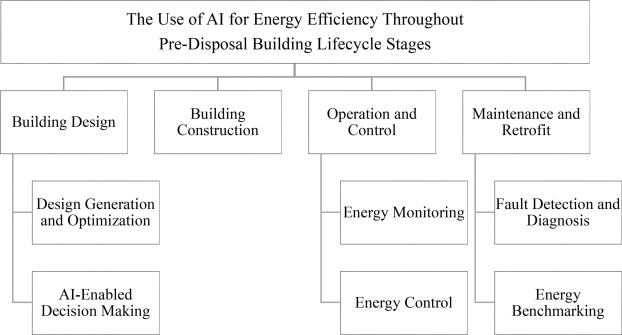
AI energy audits move beyond static blower-door tests to continuous, data-driven analysis of real-time consumption patterns.
The result is a shift from reactive repairs to proactive optimization. Instead of guessing which insulation upgrade will pay off, you get specific, automated recommendations based on your actual energy flow. This precision reduces waste and ensures that every efficiency dollar spent contributes directly to lowering your carbon footprint and grid dependency.
Gather the right data before you start
AI energy audit software is only as good as the information you feed it. Before you log in, you need to assemble a complete picture of your building’s energy use, physical layout, and operational habits. Skipping this step leads to inaccurate baselines and wasted time.
Collect utility bills and meter data
Start with the last 12–24 months of utility bills. You need monthly totals for electricity, natural gas, and water if available. This historical data allows the AI to identify seasonal patterns and seasonal spikes in consumption.
If your building has smart meters, export the granular interval data (15-minute or hourly readings). This level of detail helps the AI pinpoint exactly when energy is being used, rather than just seeing the monthly total. You can often download these files directly from your utility provider’s online portal or the meter manufacturer’s dashboard.
Document building layout and systems
AI models need to understand the physical structure to simulate energy flows. Gather your building’s floor plans, square footage, and construction year. Note the types of insulation, window glazing, and roofing materials.
List your major energy-consuming systems: HVAC units, lighting types, and large appliances. Include the make, model, and age of these systems. If you have an existing energy audit report or building commissioning data, include it here. This context helps the AI distinguish between energy lost through poor insulation versus energy lost through inefficient equipment.
Pre-audit data checklist
-
12–24 months of electricity, gas, and water bills
-
Smart meter interval data (15-min or hourly)
-
Building floor plans and square footage
-
Construction year and insulation details
-
HVAC, lighting, and appliance make/model/age
-
Previous audit reports or commissioning data
Run the AI audit using modern software
The transition from manual checklists to an AI energy audit requires feeding structured data into specialized platforms. These tools transform raw utility bills and sensor readings into actionable insights. The goal is to automate the heavy lifting of data cleaning and pattern recognition, allowing you to focus on the results.
Modern platforms handle the ingestion process by connecting to building management systems (BMS) or accepting CSV uploads. Once the data is live, the AI begins normalizing readings against weather patterns and occupancy schedules. This normalization is critical for distinguishing between weather-related spikes and genuine inefficiencies.
Step 1: Prepare and upload utility data
Before launching the audit, gather at least 12–24 months of historical energy data. This timeframe allows the AI to establish a baseline for seasonal variations. Export data from your utility portals or BMS in a standard CSV format. Ensure columns are clearly labeled with dates, consumption units (kWh, therms), and cost.
Upload the file to your chosen platform. Most tools will automatically flag missing values or outliers during this stage. Correct any obvious errors, such as negative consumption or duplicated entries, to prevent the AI from learning from bad data.
Gather 12–24 months of utility records. Export to CSV with clear date and unit labels. Upload to the platform to establish a seasonal baseline.
Input square footage, occupancy schedules, and HVAC types. This context helps the AI distinguish between normal operational load and waste.
Activate the platform’s anomaly detection. The AI will flag deviations from the baseline, such as equipment running during unoccupied hours or sudden efficiency drops.
Compare your building’s performance against similar facilities. This reveals if your savings opportunities are unique or if you are falling behind industry standards.

Review the automated findings. Export the final audit report with prioritized recommendations for maintenance or retrofit projects.
Step 2: Configure building parameters
Data alone is not enough; the AI needs context. Input your building’s physical attributes, including square footage, number of floors, and primary HVAC systems. Add operational details like shift hours and occupancy density. This metadata allows the AI to normalize consumption, ensuring it compares apples to apples when identifying waste.
Step 3: Run anomaly detection algorithms
Once configured, the platform runs its core algorithms. Look for features like automated anomaly detection, which flags irregularities such as equipment running during unoccupied hours. These patterns are often invisible in monthly bills but represent significant energy leaks. The AI prioritizes these issues by potential savings impact.
Step 4: Benchmark against industry peers
A raw number is less useful than a comparison. Use the platform’s benchmarking tools to see how your building performs against similar facilities in your region or sector. This highlights whether your efficiency is competitive or if there is significant room for improvement.
Step 5: Generate and export the report
Finally, review the generated insights. Modern platforms provide automated reporting with prioritized recommendations. Export these findings to share with stakeholders or to guide your next round of physical upgrades.
Integrate results with your smart grid
Your energy audit is just data until you connect it to your home’s automation system. This step turns passive numbers into active savings by configuring smart devices to respond to grid signals and time-of-use rates. The goal is to shift high-energy tasks—like running the dishwasher, charging an EV, or pre-cooling the house—away from peak demand hours when electricity is most expensive and the grid is most strained.
Start by mapping your audit’s findings to specific devices. If the audit flagged your HVAC as the largest energy consumer, link your smart thermostat to your utility’s demand response program. Many utilities offer rebates for allowing temporary adjustments during peak events. For other appliances, use smart plugs or built-in smart features to schedule operations during off-peak windows, typically late at night or mid-afternoon depending on your local rate structure.
To ensure your devices communicate effectively, use a central hub or platform that supports common standards like Matter or Zigbee. This allows you to create rules that react to real-time grid conditions. For example, you can set a rule that automatically lowers the thermostat by two degrees when the utility sends a peak pricing alert, or delays EV charging until solar production peaks in the afternoon.
For developers or advanced users, integrating directly with your smart home API can provide more granular control. Below is a conceptual example of how you might structure an API call to adjust device settings based on grid load data.
Finally, verify your integration. Monitor your energy dashboard for a week to ensure devices are triggering correctly and that you are seeing the expected reduction in peak usage. This validation ensures you are maximizing both efficiency and potential rebates without sacrificing comfort.
Avoid common AI audit mistakes
An AI energy audit is only as useful as the data you feed it. Garbage in, garbage out is the simplest rule, but in energy modeling, the consequences are more expensive. You might get a beautiful dashboard with green arrows, but if the input data is flawed, the recommendations will miss the mark.
Check data quality first
Before running any algorithm, verify the integrity of your input files. This means checking for missing meters, inconsistent timestamps, or obvious outliers in your energy consumption data. If you skip this step, the AI will smooth over errors rather than flag them, leading to a false sense of accuracy. Treat your data like a foundation; if it’s cracked, the whole structure leans.
Verify automated estimates
AI models can generate estimates quickly, but they rarely account for local nuances without verification. Do not accept automated suggestions for equipment upgrades or behavioral changes without cross-referencing them against your actual usage patterns. A model might suggest replacing an HVAC unit because it predicts high load, but it won’t know if your building has unique shading or occupancy quirks that change the equation.
Account for local grid limits to account for
Energy efficiency isn’t just about what happens inside your walls; it’s also about the grid you’re connected to. Many audits ignore local grid constraints, such as peak demand charges, renewable energy availability, or voltage stability issues in your specific area. An AI tool might optimize for lowest cost globally, but that solution could be impractical or even harmful to your local infrastructure. Always layer local utility constraints on top of the AI’s general recommendations.
Frequently asked questions about AI energy audits
How much does an AI energy audit cost?
AI-driven audits typically cost less than traditional manual assessments because automation reduces the hours required for data analysis and reporting. Platforms like Wattnow use artificial intelligence to automatically detect anomalies and identify savings opportunities, which streamlines the process significantly. While exact pricing varies by provider and home size, the reduced labor overhead often makes these digital audits more accessible for homeowners seeking quick insights.
Are AI energy audits accurate?
The accuracy of an AI audit depends on the quality of the data you provide, such as utility bills and smart meter readings. Modern AI tools analyze historical usage patterns to propose optimized actions, offering a high level of precision for identifying waste. However, they cannot replace a physical inspection for issues like hidden insulation gaps or duct leaks. Think of the AI audit as a diagnostic screen that highlights where a professional might need to look closer.
Do I qualify for tax credits with an AI audit?
Yes, many AI audits help you identify improvements that qualify for the 25C tax credit, which covers energy-efficient home improvements. The automated reporting generated by these tools often includes the specific product specifications and performance data needed to substantiate your claim with the IRS. This makes the documentation process smoother, ensuring you don’t miss out on potential savings when filing your taxes.
No comments yet. Be the first to share your thoughts!