
Pick the right finance app
Choosing the correct finance app depends on where your money needs help most. Budgeting apps track daily spending and categorize transactions. Investing platforms use AI to build and rebalance portfolios automatically. All-in-one suites combine both functions into a single dashboard. Picking the wrong type leads to tool fatigue and fragmented data.
| Tool Type | Best For | Automation | Data Source |
|---|---|---|---|
| Budgeting | Tracking expenses and setting limits | High (categorization) | Bank feeds |
| Investing | Growing wealth and asset allocation | High (portfolio rebalancing) | Brokerage accounts |
| All-in-One | Holistic net worth tracking | Medium (manual linking) | Multiple accounts |
Start by auditing your current financial pain points. If you are unsure where your money goes, a dedicated budgeting app is the right first step. If you have savings but no strategy for growth, an investing-focused app will serve you better. Only choose an all-in-one platform if you already have a clear budget and need a unified view of your net worth.


As an Amazon Associate, we may earn from qualifying purchases.
Connect accounts securely
Linking your bank and investment accounts is the foundation of any automated finance solution. Without live data, the system cannot track spending, automate savings, or detect fraud. The process is straightforward, but you must prioritize security at every step.
Choose a reputable aggregator
Most finance apps do not connect directly to banks. Instead, they use third-party aggregators like Plaid or Yodlee to fetch data. These services act as intermediaries, handling the authentication and data transfer. This means your actual banking credentials are often not stored by the app itself. Check the app’s documentation to see which aggregator they use. Reputable aggregators are SOC 2 compliant and use bank-level encryption.
Start with a read-only connection
When you begin the linking process, look for the option to grant "read-only" access. This allows the system to view your transactions and balances without the ability to move money or change settings. Most modern finance apps default to this mode, but it is worth verifying. If a tool requires write access for basic budgeting, consider it a red flag.
Verify the encryption and authentication
Before entering your credentials, ensure the connection is secure. Look for "https" in the URL and a padlock icon in the browser address bar. If the app asks you to log in directly on its site, ensure the domain matches the official provider. If it redirects you to your bank’s official login page, that is the safest method. Never enter your banking password into a third-party form that does not redirect to your bank.
Review permissions regularly
Once connected, the system will pull data in real-time. However, you should review these permissions periodically. Log into the app’s settings to see which accounts are linked and what data is being accessed. If you no longer use a specific bank account, disconnect it immediately. This minimizes your exposure in case of a data breach.

Download the official app from the App Store or Google Play. Verify the developer name matches the official company. Avoid third-party resellers or unofficial APKs.
Navigate to the "Accounts" or "Settings" section in the app. Click "Add Account" or "Connect Bank." Select your financial institution from the list. The app will redirect you to the aggregator’s secure login page.
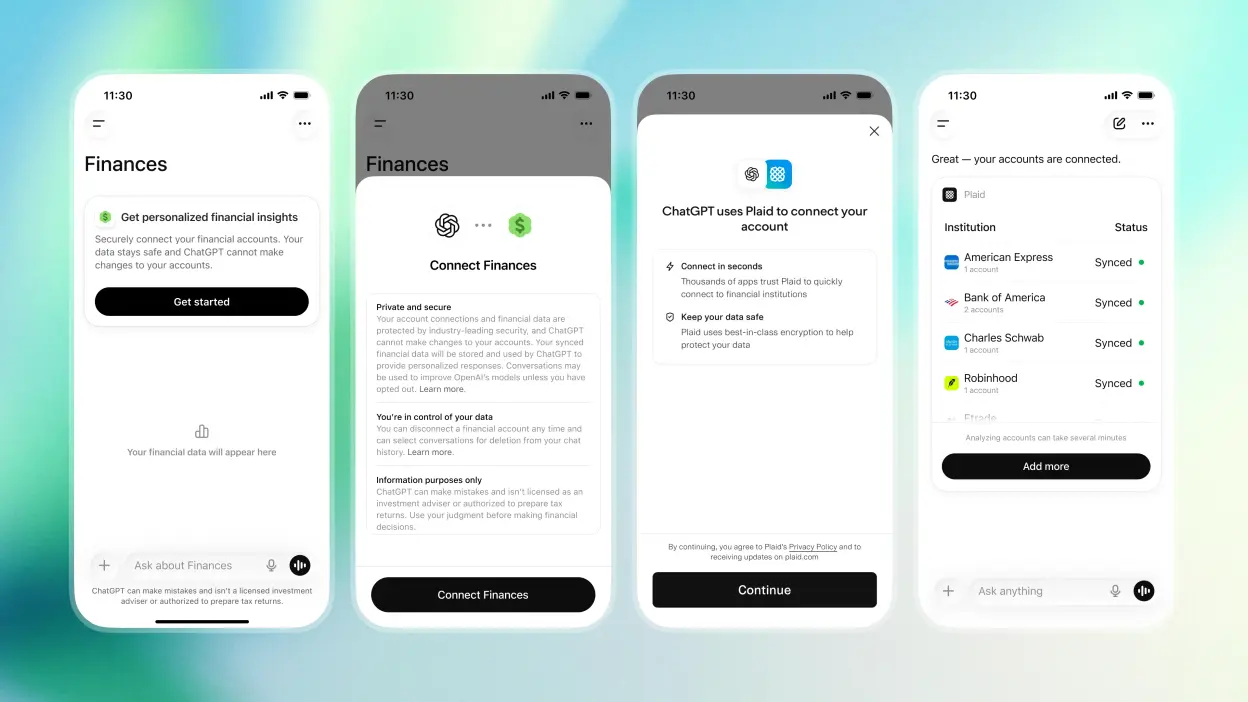
Enter your online banking credentials on the official bank login page. Complete any two-factor authentication (2FA) steps required by your bank. Do not share these credentials with anyone. The app will never ask for your password directly.
Review the permissions screen. Ensure only "read" access is granted for transactions and balances. Avoid granting "write" access unless absolutely necessary for automated investing features. Confirm the connection. The app will now begin syncing your data.
Train the system on your habits
Automated finance tools learn by watching your transactions, but they start with zero context. If you don’t teach them your specific rules, they will flag your normal spending as anomalies. A $5 coffee isn’t a glitch; it’s a habit. Here is how to customize your app so it stops interrupting you with false alarms.
Let the system run in read-only mode for the first month. Do not enable auto-categorization or spending alerts yet. Use this time to let the system ingest your full transaction history. This baseline data helps the AI distinguish between one-time irregularities and recurring patterns, ensuring it doesn’t mistake your regular rent payment for a suspicious charge.
Most finance apps default to generic categories like "Food" or "Transport." Refine these to match your actual lifestyle. If you spend heavily on dining out but rarely on groceries, create a specific "Dining" category with a higher monthly limit. This prevents the system from flagging a nice dinner as a budget breach while ignoring actual overspending in less monitored areas.
Configure alerts to trigger only on truly unusual activity. Instead of getting notified for every purchase, set thresholds for significant deviations. For example, tell the system to alert you only if a single transaction exceeds $50 or if your total spending in a category jumps by more than 20% compared to the previous month. This reduces notification fatigue and keeps you focused on real issues.
Once these rules are in place, the system shifts from being a passive tracker to an active assistant. It understands your financial rhythm, allowing you to focus on strategic decisions rather than manual data entry. Regularly review these rules quarterly to adjust for life changes like a new subscription or a shift in income.
Review insights weekly
Automated finance tools are only as good as your attention. Without a regular check-in, small errors compound, and the tool drifts from your actual financial reality. Treat your weekly review like a steering adjustment rather than a full rebuild.
Start by checking the app’s budget categories against your bank statements. Systems often misclassify transactions—like tagging a grocery store purchase as "dining" or splitting a single bill across multiple categories. Correct these immediately so the algorithm learns your specific spending habits. This keeps your "spending power" calculations accurate.
Next, verify that your net worth and investment tracking are up to date. If you linked a new brokerage account or made a manual transfer, ensure the app reflects it. A disconnect here can skew your long-term projections and make your AI-generated advice feel disconnected from your life.
Finally, ask the system for a "sanity check" on the week. Prompt it to highlight any unusual spending spikes or deviations from your plan. If the tool flags something you know was a one-time event (like a holiday gift), mark it as such. This trains the model to distinguish between noise and trends.
Weekly review checklist
-
Reconcile 3-5 misclassified transactions from the bank feed.
-
Confirm new accounts or manual entries are reflected in net worth.
-
Review AI-generated spending trends for one-week anomalies.
-
Update any life changes (new job, move, debt payoff) in settings.
-
Ask the system for a "sanity check" on the past 7 days.
Common setup mistakes to avoid
Most finance apps promise to cut your budgeting time in half, but the software only works if you set it up correctly. The biggest trap is treating automation as a set-and-forget solution. If you hand over control without verifying the initial data, the system will simply automate your mistakes at high speed.
Over-relying on automation without verification
Finance apps can detect patterns and move money faster than you can, but they lack context. An algorithm might categorize a one-time medical expense as a recurring subscription or flag a large grocery haul as unusual spending. If you skip the initial review, these errors compound. Check your first month of categorized transactions line by line. Correct the misclassifications immediately so the model learns your actual habits rather than your accounting errors.
Ignoring privacy settings and data permissions
Many users grant finance apps access to every linked account without reading the fine print. This often includes permissions to initiate transfers or view sensitive transaction metadata. Before connecting your bank, review the specific permissions requested. Revoke access to accounts you don’t need the app to monitor. Use strong, unique passwords for the finance app itself, separate from your banking credentials, to limit the blast radius if the platform is compromised.
Setting unrealistic budget targets
Finance apps excel at forecasting, but they rely on your historical data. If you input aggressive savings goals based on idealized income scenarios, the app will generate constant "overspending" alerts that you will eventually ignore. Start with conservative targets based on your last three months of actual spending. Allow the system to adjust these baselines gradually as it gathers more data, rather than forcing a radical behavioral change on day one.
Frequently asked: what to check next
Finance apps handle sensitive financial data, so security and privacy are the first concerns for most users. Reputable platforms use bank-level encryption and read-only API connections, meaning they can view transactions but never move your money without explicit authorization. Always verify that a tool is SOC 2 compliant before linking your accounts.
No comments yet. Be the first to share your thoughts!