
Why 2026 Changes the Coding Game
The role of the junior developer has shifted from writing boilerplate to directing autonomous agents. In 2026, AI coding assistants are no longer simple autocomplete tools that suggest the next line of code. They are agentic workflows capable of understanding project context, executing multi-step tasks, and debugging complex errors without constant human intervention.
This transition means that entry-level positions now require a different skill set. Instead of memorizing syntax, developers must learn to architect systems, review AI-generated code for security and efficiency, and manage the integration of multiple AI tools into a cohesive development pipeline.
For teams adopting these tools, the focus is on concrete product features that enable this autonomy. The best assistants in 2026 offer deep IDE integration, real-time collaboration with AI, and the ability to learn from codebase patterns over time. This allows junior developers to contribute meaningfully to larger projects much earlier in their careers, provided they can effectively guide and verify the AI's output.
The following section breaks down the top five AI coding assistants dominating the market this year, evaluating them based on their agentic capabilities, ease of use, and impact on developer productivity.


As an Amazon Associate, we may earn from qualifying purchases.
5 AI Coding Assistants 2026: The Tools Replacing Junior Devs
By 2026, AI coding assistants have evolved from autocomplete tools into autonomous agents capable of managing entire pull requests. This roundup evaluates five specific platforms based on their actual deployment features, error-handling capabilities, and integration depth.
-
Cursor Agentic IDE Features
Cursor’s agentic mode transforms the editor into an autonomous workspace. It executes multi-step coding tasks without constant human intervention, handling file creation, refactoring, and debugging in a single flow. This shifts the developer’s role from typist to reviewer, significantly accelerating the initial scaffolding phase of complex projects while maintaining code quality through built-in linting and testing integrations. -
GitHub Copilot Enterprise Integration
GitHub Copilot Enterprise embeds AI directly into the corporate workflow, leveraging private codebases for context-aware suggestions. It integrates seamlessly with Azure DevOps and GitHub repositories, allowing teams to generate documentation and unit tests that align with existing architectural patterns. This enterprise-grade security ensures sensitive code remains within the organization’s boundary while boosting developer productivity through tailored assistance. -
Claude Code Reasoning Capabilities
Claude Code excels in complex reasoning tasks, breaking down ambiguous requirements into structured technical plans before writing code. Its deep understanding of context allows it to debug intricate logic errors that stump simpler models. By prioritizing accuracy over speed in critical sections, it serves as a reliable senior engineer partner, reducing the need for extensive manual code reviews and rework in high-stakes development environments. -

Cline Autonomous Agent Tools
Cline operates as a fully autonomous agent, capable of executing shell commands, installing dependencies, and managing version control without user prompts. It bridges the gap between high-level intent and low-level system configuration, handling the tedious setup tasks that often bottleneck junior developers. This automation allows teams to focus on architectural decisions rather than environmental configuration, streamlining the deployment pipeline significantly. -

Windsurf Context Awareness
Windsurf distinguishes itself through superior context awareness, maintaining a deep understanding of the entire codebase across multiple files and sessions. It anticipates developer needs by predicting next steps based on current editing patterns and project structure. This proactive assistance reduces cognitive load, allowing developers to maintain flow state longer and produce more consistent code by minimizing context-switching errors and forgotten dependencies.
How to Pick the Right Assistant
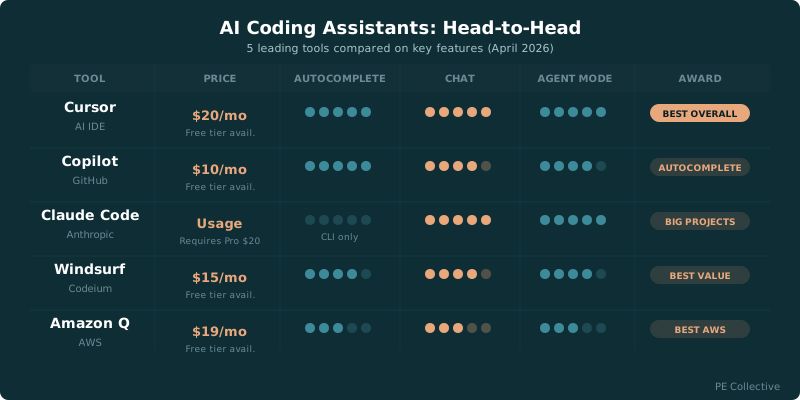
Choosing an AI coding assistant depends on your team size, existing tech stack, and budget. The tools replacing junior devs aren't just about autocomplete; they are about workflow integration and autonomy levels. Use the comparison below to weigh price against features.
| Tool | Price | IDE Support | Autonomy |
|---|---|---|---|
| GitHub Copilot | $10/mo | VS Code, JetBrains | Low |
| Cursor | $20/mo | Custom Fork | High |
| Claude Code | $20/mo | Terminal | High |
| Codeium | Free | VS Code, JetBrains | Medium |
| Replit AI | $25/mo | Replit IDE | Medium |
For teams looking for specific hardware or subscription bundles, consider these popular developer tools.



As an Amazon Associate, we may earn from qualifying purchases.
FAQ: AI Coding Assistants 2026
Do AI coding assistants replace junior developers? Not entirely. These tools automate routine boilerplate and debugging, which shifts the junior developer role toward architecture, code review, and complex problem-solving. Instead of writing every line, juniors now act as editors and integrators, using assistants like Cursor or GitHub Copilot to speed up delivery while focusing on system design.
How much do AI coding tools cost in 2026? Pricing has shifted toward tiered subscriptions. GitHub Copilot and Cursor offer robust free tiers for individual learners, while professional teams pay $20–$40 per user monthly for advanced features like multi-file context and enterprise security. Enterprise-grade tools like Amazon Q Developer often bundle with existing AWS contracts.
Which AI coding assistant is best for beginners? GitHub Copilot remains the top choice for newcomers due to its deep IDE integration and vast learning resources. It provides real-time suggestions that help beginners understand syntax and best practices without overwhelming them. For those seeking a more guided experience, Cursor’s interactive chat features offer better explanations for complex logic.
Can AI assistants handle full-stack development? Yes, but with caveats. Modern agents like Claude Code and Windsurf can generate full features across frontend and backend, but they still require human oversight for security, performance optimization, and integration testing. They are powerful co-pilots, not autonomous captains, and final code quality depends on developer input.
No comments yet. Be the first to share your thoughts!